ConnectServices: the operational Web GIS for managing and using your geographic data
Centralise, edit, view and analyse your network and infrastructure data from a platform accessible online.


ConnectServices is an operational Web GIS developed by Dotic to centralise, edit, view, analyse and share geographic data on networks and infrastructure from a browser.
The platform brings together mapping, management indicators, advanced network views and an AI assistant in a shared environment.
What is ConnectServices used for?
Cross-reference data from different sources
In ConnectServices, you can cross-reference project deliverables, view interactions with other infrastructure and assess the impact of environmental and topographic data (WMS and WFS data feeds, integration of PCRS — Plan de Corps de Rue Simplifié…). This helps you analyse a situation in context and avoid decisions based on incomplete information.
Plan and track field activity (jobs, checks, operations)
ConnectServices enables you to prepare, plan and track jobs, checks and operations. ConnectField can complement this workflow by collecting and updating data in the field to maintain a consistent flow between the field and the office.
Manage assets and maintain a reliable view of the network
With ConnectServices, you structure your knowledge of infrastructure: equipment, sections, sites, task-specific attributes, condition and history. The aim is a clear view of assets that can be used by operational teams and decision-makers alike.
Share data access with a large number of users
ConnectServices makes geographic data more widely accessible: store and maintain its history, consult it, filter it and understand a feature, without depending on a specialist tool or systematically calling on an expert.
Supervise, prioritise and maintain
ConnectServices facilitates supervision and prioritisation: identify areas requiring attention, track progress and share a common view of actions (maintenance, checks, targeted campaigns, resilience…).
Who is ConnectServices for?
ConnectServices is designed for organisations that operate, maintain or transform networks and infrastructure: local authorities, network managers, operators, engineering consultancies, contractors, asset operators and GIS managers.

Accessibility
Make data accessible and usable by authorised users without multiplying exports.
Management
Use data to track progress, priorities, risks and maintenance operations.
Collaboration
Enable stakeholders to work with a shared reference dataset and a common view of the network.
How does ConnectServices work?
- Integrate GIS data and task-specific reference datasets.
- Centralise information in a shared reference dataset.
- View data on a map and in network views.
- Create or update data according to granted permissions.
- Analyse data using filters, indicators and AI tools.
- Share information between users and professional teams.
- Manage field operations, maintenance and decision-making.
Advanced ConnectServices features: go beyond the map
In ConnectServices, certain features turn the Web GIS into a management tool: field assessment, understanding impacts, activity tracking and faster analysis through AI.
Integrated AI assistant: make analysis accessible to everyone

In ConnectServices, the AI assistant helps simplify analysis and make exploration more intuitive, following an approach from operational questions to data interpretation. Dotic puts AI at the heart of GIS with the Connie assistant, enabling users to interact with data in natural language and personalise analysis and decision-making.
Some use cases
– Explore an area without prerequisites (zone, network, categories, statuses)
– Produce indicators and operational insights more quickly
– Speed up the preparation of reports or an operational review
What this replaces
Technical queries, back-and-forth exchanges between teams and dependence on a few experts.
Result
Greater autonomy and a faster transition from data to decisions.
View Street View and Panoramax: see field conditions without travelling

In ConnectServices, views such as Street View or Panoramax place a feature in its surroundings (façade, pole, chamber, road footprint, accessibility), helping you make a sound decision before sending a team.
Some use cases
– Prepare a job (access, constraints, risks)
– Assess a report (consistency between data and field conditions)
– Quickly resolve uncertainty (avoid back-and-forth exchanges)
What this replaces
Checks performed without a clear view, imprecise exchanges or exploratory site visits.
Result
More reliable preparation and better coordination between stakeholders.
Example: before a job, the user views the surroundings of the equipment using Street View or Panoramax to identify access points and field constraints and prepare the job effectively.
Schematic view: understand the network structure at a glance

The schematic view in ConnectServices provides a functional view of relationships between features (connections, dependencies, sequences, statuses). It complements the map when you need to quickly understand what depends on what.
Some use cases
– Identify the impacts of an anomaly or incident
– Move up or down a chain of features from an asset, site or area
– Check the consistency of a group (continuity, connections, structure)
What this replaces
Lengthy layer-by-layer analyses or external diagrams that are not synchronised with the data.
Result
More reliable preparation and better coordination between stakeholders.
Example : an incident is reported. In the schematic view, the user identifies the common feature explaining the impact and prioritises the job.
Discover dynamically linked views in the video
Statistical indicators: manage rather than just observe

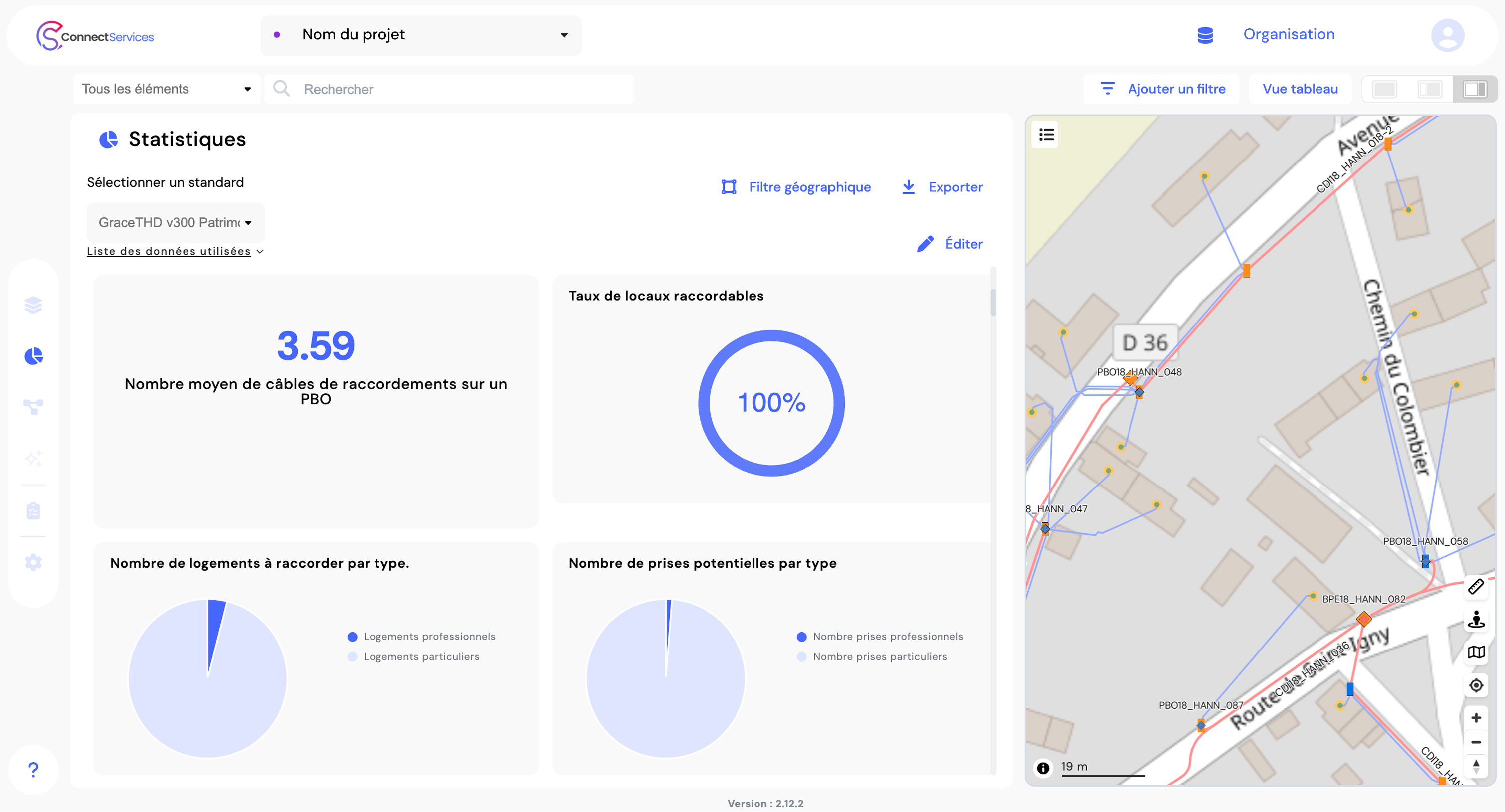
In ConnectServices, indicators turn data into useful management information: volumes, condition, completeness, distribution, trends and field activity. Each authorised user can organise a dynamic dashboard according to their needs.
Examples of useful indicators across networks
– Completeness rate by area / network / feature type
– Features to check (by status, priority, anomaly)
– Volumes by category (equipment, sections, sites)
– Civil engineering route lengths
– Updates over time (week/month)
– Jobs: completed / pending / overdue
– Areas with high values: density, incidents, anomalies, etc.
What this replaces
Recurring exports, manual spreadsheets or analyses limited to a few specialists.
Result
A shared understanding of the situation and easier decisions (prioritisation, planning, monitoring).
Example : the operations manager monitors completeness and activity in an area every week. They launch a targeted inspection campaign and measure improvement over time.
Data editing: create and develop your network reference datasets
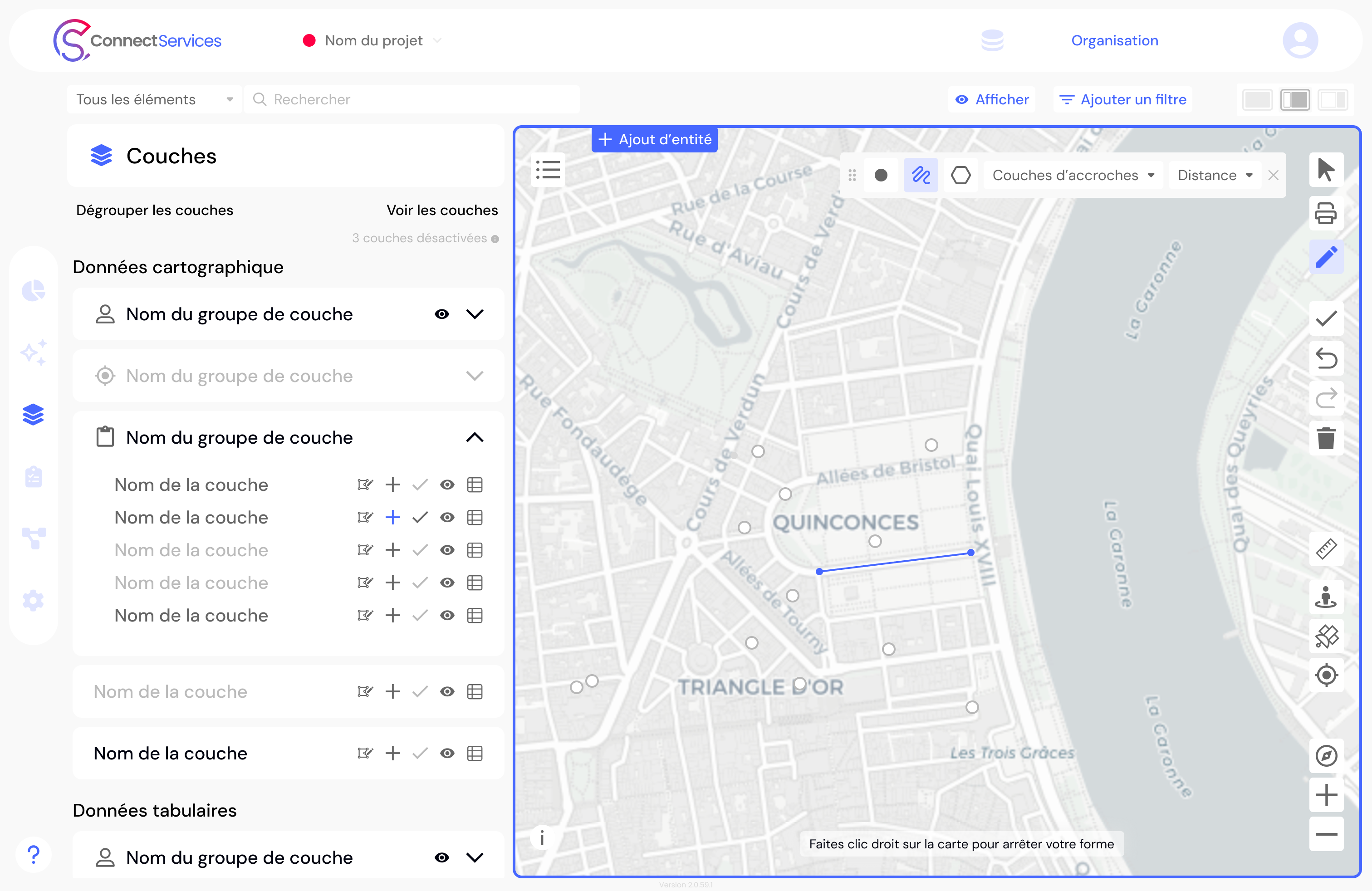
Some Web GIS solutions only allow data viewing and sharing. ConnectServices also enables you to create or edit geographic features from a browser: entities, geometries, attributes and statuses, according to granted permissions.
Some use cases
– Create a new network or extend an existing one
– Update an infrastructure asset register
– Edit the geometry or attributes of existing features
– Change a feature’s status, for example as part of a copper network being decommissioned
– Manage different types of geolocated assets beyond networks alone, such as trees, bicycle stands or other field equipment or land improvements
Objective
Users can therefore design, develop and improve the reliability of their data in the same working environment.
NEW
Edit, create and update your geographic reference datasets

With its new editing mode, ConnectServices extends its capabilities to enable not only the viewing, management and sharing of territorial data, but also its creation, updating and editing directly in the tool.
This development marks an important step: it complements the platform’s functional components to provide a more complete, smoother and more collaborative experience, closely aligned with operational uses.
With this new component, ConnectServices reaches an important functional milestone.
Editing mode is not a standalone feature: it builds on the platform and strengthens its overall coherence. Once data is created or updated, it can immediately be viewed, shared, used and managed in the same environment.
This is a strong differentiating factor: it is still very rare for a Web GIS to offer genuine editing capabilities, usually reserved for desktop GIS.
Which networks and infrastructure can ConnectServices be used for?
ConnectServices can be configured for different networks and geolocated assets.
- Fibre optics and telecommunications
- Water and wastewater
- Electricity and public lighting
- Electric charging infrastructure
- Public works
- Other geolocated assets
ConnectServices and ConnectField: what is the difference?
ConnectField and ConnectServices are two complementary solutions developed by Dotic: ConnectField enables you to collect and update data in the field, while ConnectServices enables you to centralise, view, check, use and report on it in a Web GIS.
What is a Web GIS, and what is it used for?

A Web GIS is a geographic information system accessible from an Internet browser. It enables users to view, map, share and, depending on the solution, edit and analyse geographic data without installing GIS software on every workstation.
ConnectServices applies this principle to the operational needs of network and infrastructure managers. Authorised users access a shared reference dataset, maps, network views and management tools from a single platform.
What is an operational Web GIS?
An operational Web GIS complements conventional mapping functions with tools tailored to an organisation’s processes: data models, indicators, user permissions, specialised views, activity tracking and analysis tools.
ConnectServices applies this approach to networks and infrastructure. It facilitates operational uses and makes data accessible to non-specialists without replacing advanced desktop GIS processing.
A clearly defined functional scope helps anticipate deployment, uses and associated costs.
Web GIS or desktop GIS: what are the differences?
Web GIS: accessible from a browser, it facilitates access, contributions, collaboration and everyday operational uses.
Desktop GIS: installed on a workstation, it remains suited to specialist geospatial processing and advanced analysis.
The two approaches can complement each other.
How do you choose a Web GIS?
Compare operational needs, user profiles and permissions, viewing and editing, formats and interoperability, data volumes, indicators, integration with the information system, hosting, SaaS mode, field requirements, support, costs and scalability.
Public sector organisations: find ConnectServices on these platforms


Dotic, publisher of the ConnectServices Web GIS
Dotic develops ConnectServices based on its expertise in geographic information systems, geographic data and infrastructure networks. The platform connects data to the operational needs of local authorities, network managers, asset operators, engineering consultancies and contractors.