Design, draw, and update your networks directly within the Web GIS platform
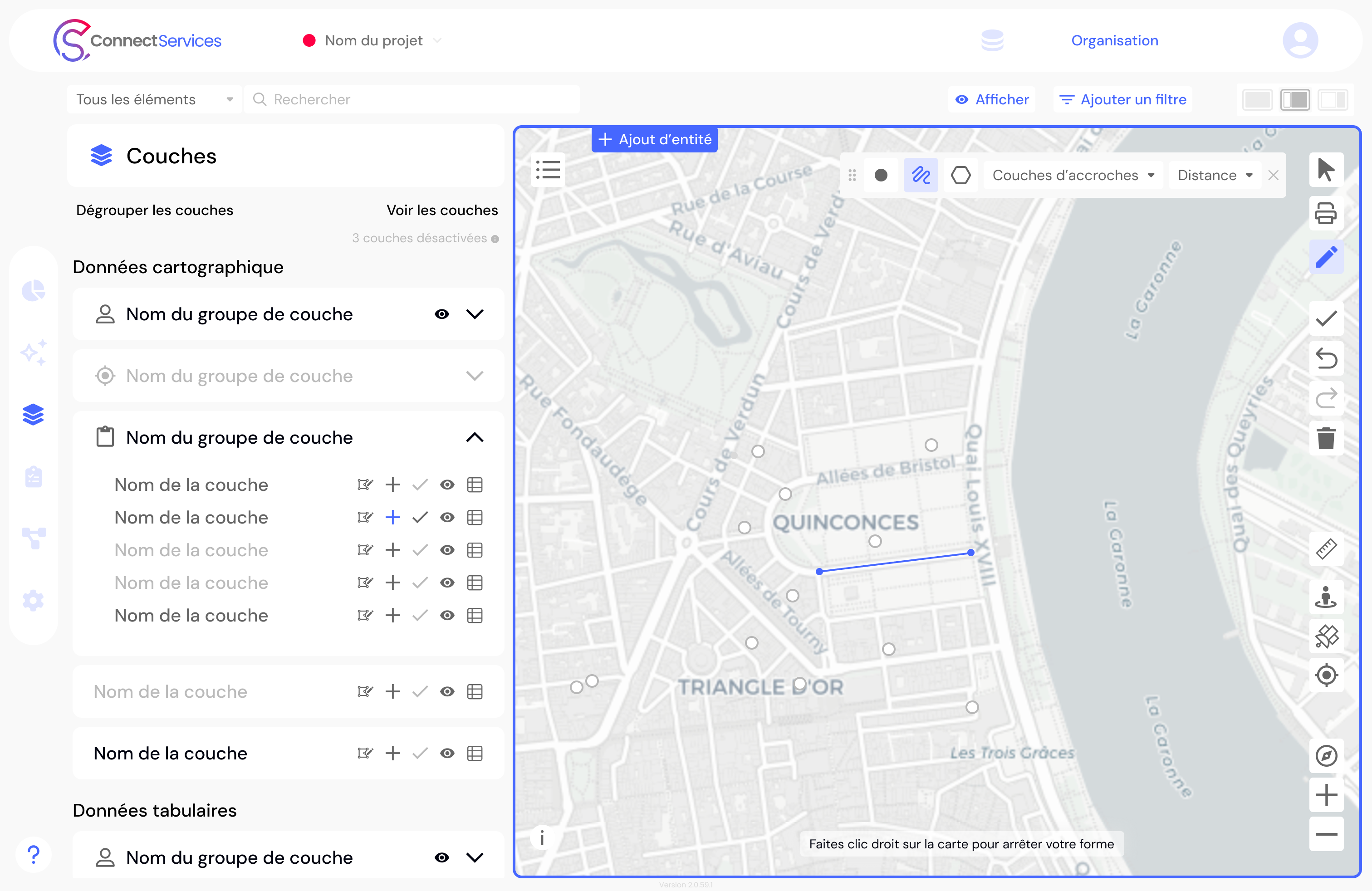
With the ConnectServices GIS platform, create, edit, and update your networks and infrastructure assets directly from a web-based interface.
Whether extending existing infrastructure, designing a new network, correcting geometries, updating attributes, or changing the status of an asset, ConnectServices provides engineering firms, infrastructure managers, operators, and public organizations with an accessible, collaborative, and operational geospatial editing solution.
Advanced network editing in the ConnectServices Web GIS platform
Geospatial data is only valuable if it remains up to date. Yet in many organizations, network creation and data maintenance still rely on complex, siloed, or difficult-to-deploy tools.
With its editing capabilities, ConnectServices takes Web GIS one step further. The platform is no longer limited to visualizing and analyzing data — it also enables active and collaborative management for designing, enriching, and evolving network infrastructure within the same environment.
This functionality addresses very practical operational needs, including:
- creating a new network or extending existing infrastructure
- modifying infrastructure assets
- correcting locations or geometries
- updating attribute data
- removing obsolete objects or outdated information
- changing the status of assets, for example during decommissioning operations
The scope extends far beyond telecom and fiber networks. ConnectServices also supports the management of water, wastewater, stormwater, electricity, and public lighting infrastructure.
More broadly, the platform enables organizations to manage any type of geolocated asset, including street furniture, bike stations, signage, green spaces, parks, and any equipment or information that needs to be inventoried and mapped.
Design, edit, and maintain network data within the same Web GIS platform
One of the key strengths of ConnectServices is its ability to bring together data visualization, editing, and operational management capabilities within a single interface — including AI-powered data querying and analysis.
In practice, this means that once a network has been created or updated, it can immediately be shared, analyzed, and operated without switching between tools. This continuity improves productivity, reduces manual data re-entry, and minimizes workflow disruptions between network design, data maintenance, and operational use.
This is what differentiates ConnectServices from many solutions on the market. Very few Web GIS platforms provide advanced editing capabilities comparable to those traditionally available only in desktop GIS environments.
Features of the ConnectServices Web GIS editing module
Map, document, and design a network or network extension
With ConnectServices, users can create and build the geospatial foundation of network assets either from an empty structure or by extending an existing network.
Network creation can be:
- geometric, directly on the map
- attribute-based, through structured data entry
- or a combination of both, depending on operational requirements
Attribute data can be edited directly from the map or through a table view to simplify structured data management. Users can also duplicate the attributes of an existing asset and quickly apply them to similar objects, accelerating repetitive editing operations.

Modify and update existing network infrastructure assets
The editing module allows users to work directly on existing assets stored in the database in order to:
- move asset locations
- adjust geometries
- correct or enrich attribute data
- update asset statuses
The table view enables users to edit all fields, including bulk updates when needed. This capability is particularly valuable for large-scale data quality improvement, migration, and network update operations.
Delete and manage geospatial entities directly in the Web GIS platform
The platform allows users to delete network assets, remove outdated geospatial data, and perform bulk deletion operations according to project workflows and access permissions.
Precise network editing with topological constraints and snapping functionality
To ensure high-quality geometric editing and maintain topology consistency, ConnectServices includes snapping capabilities that simplify the alignment and connection of network assets.
The snapping area can be configured, as well as the reference layers used for snapping, including point assets, poles, chambers, or other structural infrastructure objects.
As a result, users benefit from greater precision and consistency during geospatial editing operations.
Collaborative network editing with real-time conflict management
Collaborative geospatial editing raises a critical challenge: what happens when multiple users modify the same assets simultaneously?
ConnectServices includes built-in edit conflict management. If several users work on the same data at the same time, conflicts are automatically detected to ensure a single, consistent version of the data is preserved.
This functionality reinforces the collaborative nature of ConnectServices and strengthens its positioning as a shared Web GIS platform designed for multi-user and multi-stakeholder environments.
To ensure full traceability, a summary of each editing session — including a detailed log of completed operations — can be downloaded.
A Web GIS solution designed for engineering teams, infrastructure managers, and network operators
The ConnectServices editing module is designed for all users who need to design, update, and maintain geolocated infrastructure assets, including:
- engineering firms
- network and infrastructure managers
- public and private operators
- public organizations and utilities
- urban planning and territorial development stakeholders
- organizations responsible for technical or urban asset management
The objective is simple: make network and infrastructure editing more accessible, fluid, and collaborative without compromising the technical accuracy required for operational geospatial data.
A more accessible interface than desktop GIS software — without compromising essential capabilities
Many organizations need to edit and maintain network infrastructure data without relying exclusively on complex desktop GIS software reserved for highly specialized users.
ConnectServices addresses this challenge through an interface that is:
- ergonomic
- user-friendly
- easy to learn and use
- accessible to operational and business users
The goal is not to oversimplify geospatial editing, but to make network and infrastructure data management accessible to a wider range of users while preserving the essential capabilities required to maintain high-quality operational data, including geometry editing, attribute management, topology rules, conflict detection, and data export.
How to create, edit, and update network data in ConnectServices
The user experience has been designed to remain simple, intuitive, and accessible:
- Open ConnectServices
- Create a project
- Define the project area
- Add a data layer to the project, whether starting from an empty structure or an existing dataset
- Enable editing mode
- Use an appropriate basemap — PCRS, OpenStreetMap, satellite imagery, or other map layers — to position assets accurately
- If needed, rely on the topology of the existing network
- Add attribute information once the asset is positioned
- Validate the changes
- Save the project
This workflow enables users to quickly transform a design or update request into operational geospatial data that can immediately be used across the system.
Open data exports to ensure long-term interoperability and data usability
All data edited in ConnectServices can be exported in widely used formats to simplify data exchange and reuse across different environments:
- Shapefile
- CSV
- GeoPackage
- KML / KMZ
- GeoJSON (for smaller datasets)
This open approach improves overall data interoperability and facilitates integration with existing GIS workflows and operational systems used by geospatial and infrastructure management teams.
Why choose ConnectServices to design, edit, and manage network infrastructure?
Choosing ConnectServices for network editing means choosing:
- a Web GIS platform capable of designing and updating networks and any type of geolocated asset
- a collaborative solution with built-in conflict management
- an accessible interface designed for operational teams and non-GIS specialists
- precise geospatial editing supported by advanced snapping capabilities
- seamless continuity between data creation, maintenance, and operational use
- an open platform supporting standard export formats and interoperability
With this new capability, ConnectServices strengthens its position within the Dotic ecosystem as a platform for geospatial visualization, operational management, advanced analytics, and now collaborative geospatial editing.
Looking for a solution to design and maintain your networks throughout the entire infrastructure lifecycle?
Discover the ConnectServices editing module and discuss your operational needs with our team.